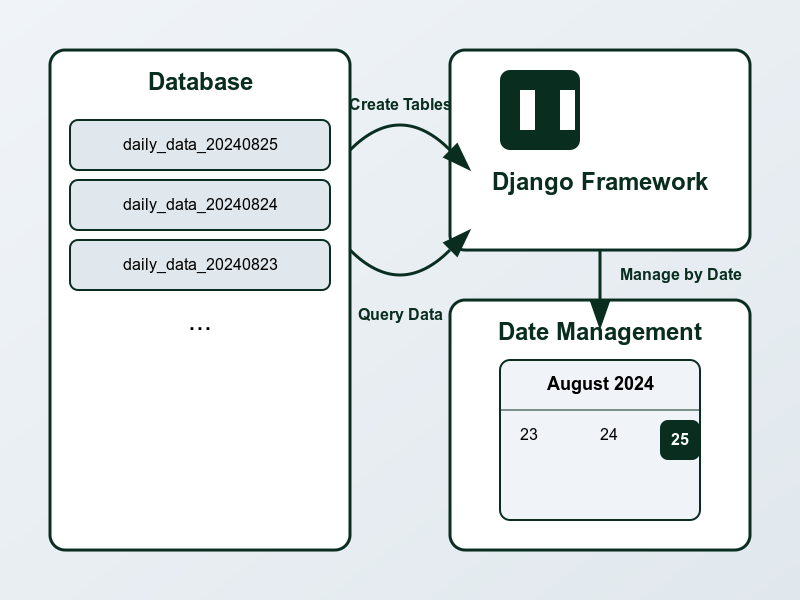
Managing Daily-Generated Tables in Django: A Practical Approach
Welcome, fellow developers and data enthusiasts! Today, we'll dive into a practical challenge: managing daily-generated tables in a Django application. This is a common scenario when dealing with data that updates daily and requires dynamic querying. In this post, we'll explore a simplified approach to dynamically accessing and working with these daily tables using Django models and views. Let's get started!
Understanding Our Challenge: Daily-Generated Tables
Before we delve into the code, let's understand the problem we’re solving. Imagine you have a database where new tables are created daily, following a naming convention like `daily_data_YYYYMMDD`. Our goal is to create a Django application that can dynamically access and query these tables without manually updating models for each new table.
## Step 1: Setting Up Your Django Project
First, ensure you have Django installed. If not, you can install it using pip:
pip install django
Then, create a new Django project and app:
django-admin startproject daily_data_project

cd daily_data_project

python manage.py startapp core
## Step 2: Defining a Simplified Model
To handle daily-generated tables, we need a model that adapts to the table names. Here’s a basic model to get us started:
python

from django.db import models


class DailyData(models.Model):

date = models.DateField()

value = models.DecimalField(max_digits=10, decimal_places=2)


class Meta:

managed = False # Django won't create or manage the table

abstract = True


@classmethod

def for_table(cls, table_name):

return type(f'DailyData_{table_name}', (cls,), {

'__module__': cls.__module__,

'Meta': type('Meta', (), {

'db_table': table_name,

'managed': False,

})

})
This model allows us to dynamically create models for different tables by specifying the table name.
## Step 3: Fetching Data Dynamically
Now, let's write a view to fetch data from the table corresponding to the current date or a date provided by the user:
python

from datetime import datetime

from django.shortcuts import render

from .models import DailyData


def fetch_daily_data(request):

# Determine the table name based on the current date

today = datetime.now().strftime('%Y%m%d')

DailyDataModel = DailyData.for_table(f'daily_data_{today}')


# Fetch data from the corresponding table

try:

data = DailyDataModel.objects.all()

except Exception as e:

data = []

print(f"Error fetching data: {e}")


return render(request, 'core/daily_data.html', {'data': data, 'today': today})
## Step 4: Creating a Template to Display Data
Create a simple template to display the fetched data. Create a file named `daily_data.html` in your `core/templates/core/` directory:
html
<!-- core/templates/core/daily_data.html -->
<!DOCTYPE html>

<html>

<head>

<title>Daily Data</title>

</head>

<body>

<h1>Daily Data for {{ today }}</h1>

<ul>

{% for item in data %}

<li>Date: {{ item.date }} - Value: {{ item.value }}</li>

{% endfor %}

</ul>

</body>

</html>
Comments
No comments yet. Be the first to comment!
Leave a Comment